Premium customers: earn 20% a year on a 3-month Locked Savings plan. Limited availability. Learn more.


How To Open An Online Bank Account In Nigeria Easily
Learn how to open an online bank account in Nigeria easily. See requirements, step-by-step guide, top digital banks like Kuda, and safety tips for 2026.

Why should you choose an online bank account in Nigeria?
Opening an online bank account in Nigeria comes with a lot of benefits, especially if you’re tired of long queues, hidden charges, and limited banking hours that don’t work for you. With a digital bank, you can check your balance, send money, and pay bills from your phone any time you want without needing to visit a physical branch.
You also spend less. Most digital banks, like Kuda, don’t charge for card maintenance or monthly fees. Because they run online with fewer overhead costs, they can afford to give you better deals like free transfers, higher interest on savings, and more.
Beyond the basics, online banks have smart tools that help you manage your money better. You can set budgets, automate savings, request instant loans, and even get spending alerts in real time. And if something goes wrong, digital banks usually offer fast and responsive customer service right inside the app without you waiting in line just to fix a small issue. Whether you’re a student, a small business owner, or just someone who wants easy banking, an online account can make your life easier.
Introducing Kuda bank.
If you’re wondering whether all these benefits are real, then you probably haven’t tried using Kuda yet. Kuda is a licensed microfinance bank regulated by the Central Bank of Nigeria (CBN) and insured by the Nigeria Deposit Insurance Corporation (NDIC), which means your money is safe.
Kuda is built for everyday Nigerians, students, side hustlers, business owners who want simple, smart, and cost-effective banking. It runs entirely online, so you don’t have to visit a physical branch to get started or fix a small issue.
What you get with Kuda’s standout features:
- Zero card maintenance fees.
- 25 free transfers to other banks every month
- Real-time spend tracking.
- Instant transfers and quick reversals.
- Access to short-term overdrafts.
- Business tools for saving, budgeting, invoicing, and payroll.
- Earn up to 12% interest on savings.
- Business name registration.
- Zero fees for paying bills or buying airtime.
By opening a personal or business account with Kuda, you get to enjoy all these benefits and more from your phone.
What you’ll need to open a Kuda account.
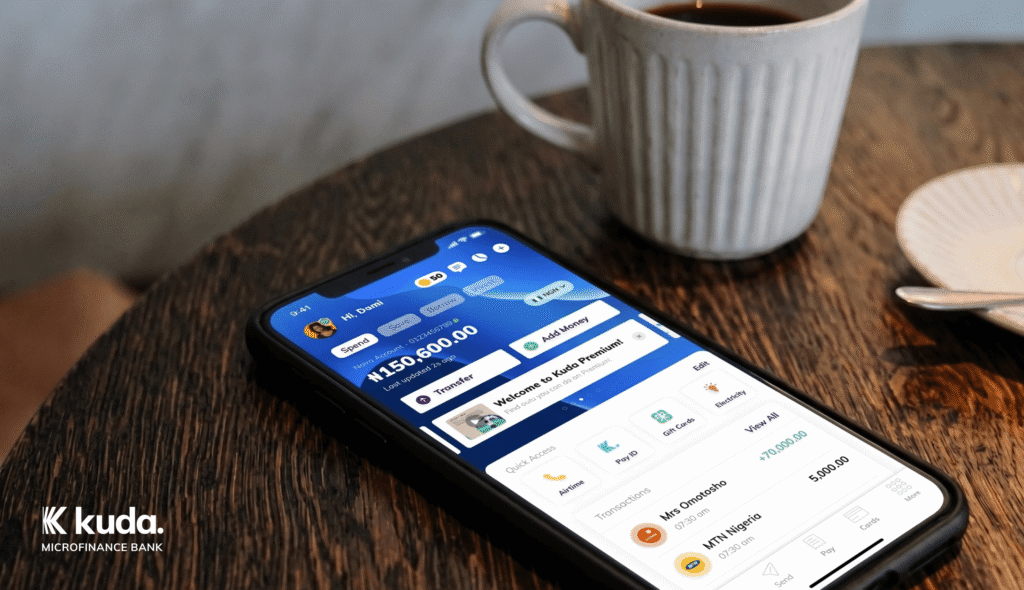
Opening a Kuda account is very easy and takes just a few minutes. You must be at least 18 years old, live in Nigeria, and have a smartphone that you can use to download the Kuda app. To open a personal account with Kuda you’ll need:
- A clear photo of your face.
- Your Bank Verification Number (BVN).
- Your NIN or a valid government-issued ID (Voter’s card or Driver’s licence).
- A working phone number and email address.
To open a Kuda Business Account, you’ll need the following documents:
- Business registration documents.
- The Certificate of Incorporation or Registration.
- Tax Identification Number (TIN).
- Bank Verification Number (BVN).
- NIN or government-issued ID (Voter’s card, Driver’s licence).
- Proof of address (utility bill or bank statement).
- Passport photographs for all account signatories.
- Business ownership details.
Additional documents depend on your business type, other licenses or certificates that might be required.
See the full list of documents needed to open a Kuda Business account here. You can also register your business name directly in the Kuda Business app, including getting your CAC registration and Tax Identification Number (TIN) with no paperwork or legal fees needed
How to open your Kuda account easily.
- Download the Kuda app from the Google Play Store for Android or the App Store for iPhone.
- Sign up and follow the prompts to create an account. You’ll need to provide your email address, phone number, and Bank Verification Number (BVN).
- Complete & verify your profile with your correct personal information. You will need to provide a valid ID like a driver’s license, voter’s card, or NIN slip. This helps Kuda verify your identity and set up your account quickly.
- Secure your account and confirm your transactions with a 4-digit transaction PIN.
- Add money to your account to start using the app’s features.
Understanding Kuda account tiers and limits: What you need to know.
Kuda Bank offers three types of accounts called tiers. Each tier has different transaction limits, features, and requirements. The higher your tier, the more you can do with your account.
Tier 1 – basic account.
This is an entry-level account. You only need your BVN to open this.
- Maximum account balance: ₦300,000
- Single transfer limit: ₦50,000
- Daily transfer limit: ₦600,000
- Single airtime top-up: ₦10,000
- Daily airtime top-up: ₦100,000
2. Tier 2 -mid-level account.
You’ll need to add your NIN and BVN to unlock this tier:
- Maximum account balance: ₦500,000
- Single transfer limit: ₦100,000
- Daily transfer limit: ₦1,000,000
- Single airtime top-up: ₦20,000
- Daily airtime top-up: ₦150,000
3. Tier 3-full access account.
This is the highest account tier. You’ll need your BVN, NIN, and a valid proof of address like a utility bill to upgrade to this tier.
- Unlimited balance and incoming transactions.
- Daily transfer limit: ₦1,000,000 by default .
- To transfer up to ₦10 million: You must send an indemnity form.
- To send more than ₦10 million: You’ll answer a few security questions.
- Single airtime top-up: ₦50,000.
- Daily airtime top-up: ₦100,000.
Funding your new Kuda account.
Adding money to your Kuda account is quick and easy. You have different options to choose from:
1. Bank Transfer
You can send money from any bank in Nigeria using your Kuda account number. Transfers are instant, and you won’t pay any extra charges to receive money. Please note that CBN charges a ₦50 Electronic Money Transfer Levy (EMTL) on electronic transfers of ₦10,000 or more.
2. Card
You can also add money to your upgraded account with a Nigerian debit card. Tap Add Money on your Kuda dashboard and choose the Add By Card option.
3. Cash Deposit
If you have cash, you can deposit it into your Kuda account at our partner banks. Tap Add Money on your Kuda dashboard and choose the Add By Deposit option to get instructions.
Once your account is funded, you can:
- Withdraw cash from ATMs.
- Buy things online and in stores.
- Pay bills and buy airtime.
- Send money to other bank accounts.
Getting your Kuda debit card.
Kuda gives you two card options to help you spend money easily:
Physical card: a physical Visa debit card you can use at ATMs, POS terminals, and online stores. It has a card number, expiry date, and CVV. Once you order through the app, we will deliver to your address.
Virtual card: a digital card stored in your Kuda app. But also comes with card number, expiry date, and CVV. It works only for online payments, and is safe for making payments on websites and apps. Once you request one, it’ll be made available immediately.
Both cards are secure and easy to use. You can freeze or block them from the app at any time.
Follow these steps to get a Kuda card:
1. Sign in to your Kuda app.
2. Tap Cards.
3. Tap Request A Card.
4. Swipe left on your screen, then tap on Get A Physical Card.
5. Create your card PIN.
6. Add and confirm your delivery information.
7. Submit your physical card request.
Is my money safe with an online bank like Kuda?
Yes. Even though Kuda is fully online, it follows the same rules as regular banks.
Here’s how we keep your money and data safe:
CBN licence: Kuda is a licensed microfinance bank regulated by the Central Bank of Nigeria.
NDIC protection: Your deposits are insured by the Nigeria Deposit Insurance Corporation.
Data encryption: We use strong encryption to protect your information.
Two-factor authentication: You can enable the PIN and biometric features to stop anyone else from unauthorised access to your account.
Privacy: We don’t share your personal details without your permission.
If anything goes wrong, you can reach Kuda’s support directly from the app.