Premium customers: earn 20% a year on a 3-month Locked Savings plan. Limited availability. Learn more.


How To Recharge Your Prepaid Meter in Nigeria (2025 Updated)
Recharging your prepaid meter is now easier than ever! No more worrying about unexpected power outages. Just follow this guide to top up your meter units easily.

Introduction
Have you ever experienced a power outage at midnight? Unpleasant, isn’t it?
So, how do you recharge your prepaid meter if you run out of units in the middle of the night?
With the Kuda app, you can recharge your prepaid meter any time, anywhere, without hidden fees.
What’s a prepaid meter, anyway?
Remember those days of “estimated bills” where you’d use power and then get a bill from the Power Holding Company of Nigeria (PHCN), formerly NEPA? Those were the days of long queues under the hot Nigerian sun!
Thankfully, we now have digital payment platforms like Kuda, so we can buy meter tokens without having to go anywhere.
Prepaid meters allow you to pay for electricity upfront. You get what you pay for.
This makes sure that everyone is billed fairly and accurately, unlike the old estimated billing system. Prepaid meters work by letting you buy electricity tokens, which you then load on your meter to activate your power supply. So, you’ll have electricity until your prepaid credit runs out. When that happens, you’ll be disconnected until you top up again.
Prepaid vs. postpaid meters: what’s the deal?
With postpaid meters, you pay for electricity after you’ve used it. This usually happens at the end of the month when you get a bill from the Power Holding Company of Nigeria (PHCN) formerly NEPA. With postpaid meters, users can use electricity without restrictions, but they often receive “estimated bills,” which, let’s be honest, aren’t usually very accurate. This means users are either undercharged or, more often, overcharged.
Forget those unpredictable “estimated bills” that leave you scratching your head, wondering how much you really owe. With prepaid meters, you’re in total control of how and when you use electricity. You subscribe to power with a token and when your meter units run out, you’ll be disconnected from the power supply.
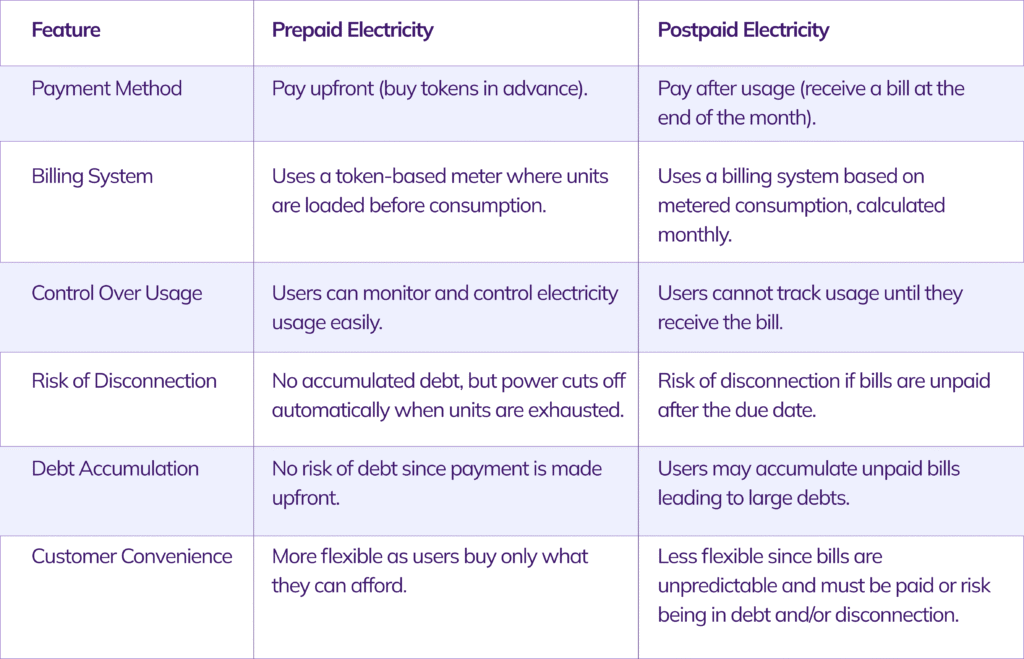
Comparing prepaid and postpaid electricity
Here’s a breakdown of the differences:
How to recharge your prepaid meter online in Nigeria with Kuda
To buy electricity units using the Kuda app, follow these steps:
1. Sign in to your Kuda app. If you don’t have an account, sign up on the web or download the Kuda app.
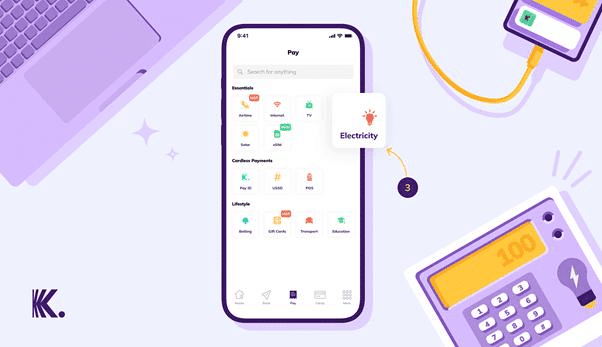
2. Tap Pay at the bottom of the Kuda app.
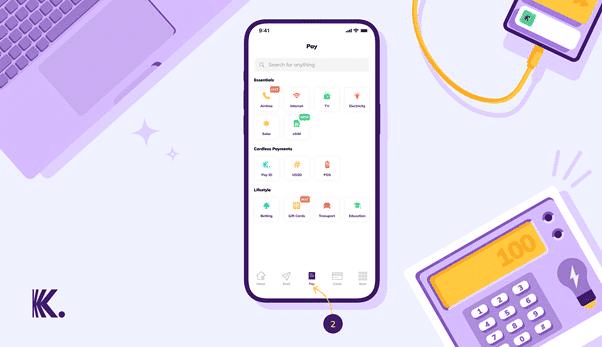
3. Tap Electricity.
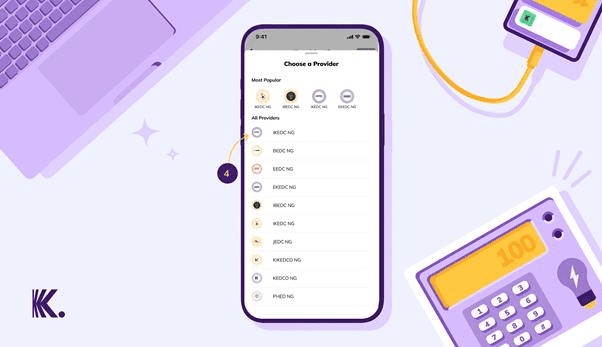
4. Choose your electricity service provider (e.g., IKEDC, EKEDC, IBEDC, AEDC, etc.).
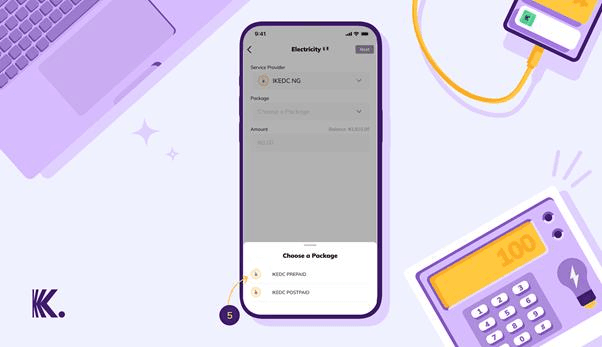
6. Tap Prepaid.
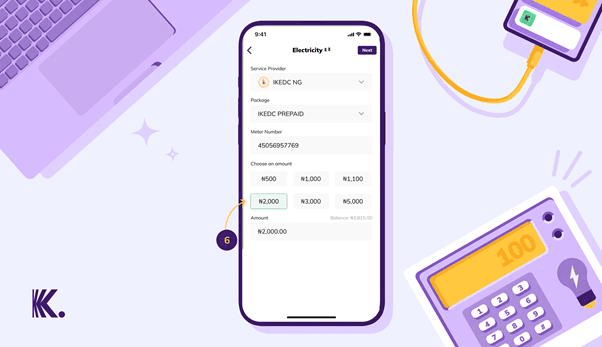
7. Type in your prepaid meter number and the amount of units you want to buy, then tap Next.
8. Complete your payment with your transaction PIN, fingerprint, or Face ID.
How to load your prepaid meter token
1. Make sure your meter or User Interface Unit (UIU) is connected to power.
2. Type in the 20-digit token number on your meter or UIU.
3. Press the Enter button or the confirmation key.
4. Wait for a confirmation message or a tick mark on the display. That’s it, your token has been loaded.
The benefits of buying meter units on Kuda
We’ve made recharging your prepaid meter easier;
- No Extra Charges – No hidden fees! Unlike traditional payment platforms that charge additional fees, with Kuda, you only pay for the electricity you buy.
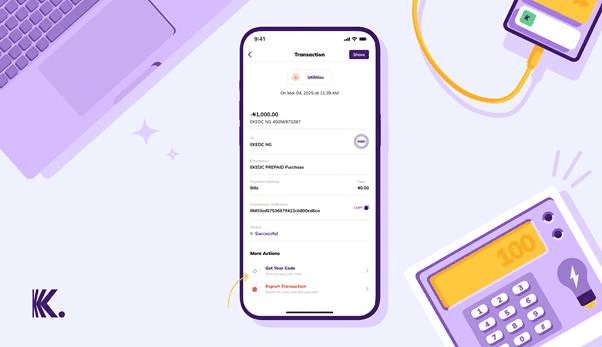
- Instant Token Retrieval – No more waiting for delayed emails. Tap the transaction on your Kuda app dashboard, then tap Get Your Code to see your meter token.
- 24/7 Access – Even if your units run out at midnight, you can recharge any time.
- User-Friendly Interface – The Kuda app is very easy to use.
- Secure Payment – Kuda prioritises your financial security.
- Other Utility Payments – In addition to electricity tokens, you can also buy airtime and data, and pay internet and TV subscriptions on the Kuda app.
Common prepaid meter problems and how to fix them
Even though prepaid meters make life easier, they can still throw a few curveballs. Here’s how to handle the most common issues:
1. Token Not Loading
- Why it happens: Network issues, wrong meter number, or a delay from the vending platform.
- What to do: Double-check your meter number before buying a token. If it doesn’t load, wait a few minutes and try again. Still not working? Reach out to your DisCo with your meter number and transaction details.
2. Meter Shows “Tamper” or Error Codes
- Why it happens: Power surges, loose wiring, or someone tried to open the meter.
- What to do: Don’t try to fix this yourself. Contact your DisCo right away, they’ll send a technician to help.
3. Lost Your Token?
- Why it happens: Maybe you deleted the SMS, your phone reset, or the message never arrived.
- What to do: If you bought online, check your purchase history. If not, contact your DisCo or the platform you used with your meter number, amount, and date of purchase.
4. Meter Bypass Detected
- Why it happens: The meter thinks someone tried to tamper with the wiring.
- What to do: Avoid illegal connections. If you’re wrongly flagged, report it to your DisCo and ask for an inspection. Remember, bypassing meters can lead to big fines.
5. Blank Screen or No Balance Display
- Why it happens: Power outage, technical fault, or low battery.
- What to do: Check your main switch and breaker. If the screen stays blank, contact your DisCo’s support team.
How to check your prepaid meter balance
Want to know how much power you have left?
- For most meters from manufacturers like MOJEC, Hexing, and Conlog either the units are always displayed on the screen, if it’s not, just press 07 (or 009 for Mojec users) and then Enter or OK.
- Your remaining units (kWh) will pop up on the screen.
If this doesn’t work, check your meter’s user guide or call your DisCo for the right code.
Emergency recharge: what you need to know
What if My Units Run Out at Night or on a Weekend?
If your units finish at an odd hour, you might be left in the dark, you can recharge quickly using the Kuda app on your mobile.
Emergency Credit (If Your Meter Supports It)
Some smart meters offer emergency credit or “friendly hours,” usually:
- Evenings (e.g., 8 PM – 6 AM)
- Weekends or public holidays
If you use emergency credit, the units will be deducted from your next recharge.
Please note that not all meters have this feature. Check with your DisCo to be sure.
Backup Power Options
- Generators: Handy, but you’ll need fuel.
- Inverters/Solar: Great for essentials like fans, lights, or your WiFi router plus, they’re more sustainable.
How much power do you really use?
Knowing your average usage helps you avoid running out of units unexpectedly.
Typical Appliance Consumption in Nigeria
LED Bulb::
- Power rating: 10 watts
- If used for about 5 hours daily
- Consumes approximately 0.05 kWh per day
Standing Fan:
- Power rating: 70 watts
- If used for around 8 hours daily
- Consumes about 0.56 kWh per day
Small Fridge:
- Power rating: 150 watts
- Runs for 24 hours a day
- Uses roughly 3.6 kWh per day
LED TV:
- Power rating: 100 watts
- If used for 5 hours daily
- Consumes about 0.5 kWh per day
Air Conditioner (1.5HP):
- Power rating: 1,125 watts
- If used for 6 hours daily
- Consumes up to 6.75 kWh per day
Electric Iron:
- Power rating: 1,000 watts
- If used for 1 hour daily
- Uses about 1 kWh per day
How to calculate your monthly units
- List your appliances
- Multiply each one’s wattage by the hours you use it daily.
- Divide by 1,000 to get kWh.
- Multiply by 30 for your monthly usage.
Example:
A 1.5HP AC (1125W) used for 6 hours daily:
(1125 × 6) ÷ 1000 = 6.75 kWh/day
6.75 × 30 = 202.5 kWh/month
Multiply your total monthly kWh by your DisCo’s rate (e.g., ₦69/kWh) to estimate your monthly bill.
Smart tips to save electricity and money
Take a look at these simple money goals and smart budgeting tips – they’ll help you stay on top of your finances, from everyday spending to paying your utility bills with ease;
- Switch to energy-saving appliances (like LED bulbs and inverter ACs).
- Turn off appliances when you’re not using them.
- Unplug chargers and electronics when idle.
- Iron clothes in bulk, not one at a time.
- Make the most of natural daylight.
Managing your electricity expenses is part of smart financial planning. Set aside a specific amount monthly for utilities to avoid surprises.
DisCo Rates in Nigeria: what you need to know
Electricity tariffs can feel confusing, but we’re here to make it simple. Here’s a quick look at the latest rates from major electricity distribution companies (DisCos) across Nigeria, including Band A and estimates for Bands B to E. These rates are current as of 2024/2025, but always check with your DisCo for the most up-to-date info.
DisCo Tariffs in Nigeria
Aba Power (Aba DisCo)
- Band A: ₦219.70 – ₦241.45/kWh
- Band B: ₦180.77 – ₦203.67/kWh
- Band C: ₦145 – ₦205/kW
Abuja Electricity Distribution Company (AEDC)
- Band A: ₦206.80/kWh
- Bands B–E: ₦74 – ₦153/kWh
Benin Electricity Distribution Company (BEDC)
- Band A: ₦206.80/kWh (estimated)
- Bands B–E: ₦100 – ₦137/kWh
Eko Electricity Distribution Company (EKEDC)
- Band A: ₦206.80/kWh
- Bands B–E: ₦79 – ₦125/kWh
Enugu Electricity Distribution Company (EEDC)
- Band A: ₦206.80/kWh
- Bands B–E: ₦95 – ₦154/kWh
Ibadan Electricity Distribution Company (IBEDC)
- Band A: ₦225.00/kWh (as of April 2024)
- Bands B–E: ₦97 – ₦140/kWh
Ikeja Electricity Distribution Company (IKEDC)
- Band A: ₦206.80/kWh
- Bands B–E: ₦69 – ₦143/kWh
Jos Electricity Distribution Company (JEDC)
- Band A: ₦206.80/kWh (estimated)
- Bands B–E: Around ₦90 – ₦150/kWh (varies)
Kaduna Electricity Distribution Company (KAEDC)
- Band A: ₦206.80/kWh
- Bands B–E: ₦88 – ₦163/kWh
Kano Electricity Distribution Company (KEDCO)
- Band A: ₦206.80/kWh
- Bands B–E: ₦90 – ₦159/kWh
Port Harcourt Electricity Distribution Company (PHEDC)
- Band A: ₦206.80/kWh
- Bands B–E: ₦100 – ₦142/kWh
Yola Electricity Distribution Company (YEDC)
- Band A: ₦206.80/kWh
- Bands B–E: ₦179 – ₦234/kWh
Please note that the actual rate depends on your location and the band you fall into. If you’re not sure, it’s easy to check.
How to Check Your Electricity Tariff Band
Not sure which band you belong to? No worries – finding out is simple:
Visit your DisCo’s website or reach out to their customer service.
For example, if you use Eko Electricity Distribution Company, you can check your band by visiting feederinfo.ekedp.com and entering your account or meter number.
Ikeja Electric customers can use the customer feeder verification page on their website to find out their band.
If you’re with a different DisCo, just check their website or give their support team a call, they’ll be happy to help you out.
Budget Better for Your Electricity Bills
Staying on top of your electricity bills doesn’t have to be stressful. With a little planning, you can avoid surprises and make your money go further every month. Here’s how to keep your energy spending in check:
1. Track Your Usage:
Keep an eye on how many units you use each week. Most prepaid meters let you check your balance easily – make it a habit.
2. Set a Monthly Limit:
Decide how much you want to spend on electricity each month. Once you know your average usage, you can set a realistic budget and stick to it.
3. Use a Calculator:
Not sure how much your appliances are costing you? Use the simple electricity cost calculator above to estimate your monthly spend.
4. Save as You Go:
Even small changes like switching off lights when you leave a room or unplugging devices can add up to big savings over time.
Remember, budgeting for your electricity is just like budgeting for anything else. The more you know, the more you can save and the more control you have over your money.
Frequently asked questions (troubleshooting common recharge issues)
1. How to Get Your Prepaid Meter Token (Token Delay or Failure)
After buying a meter token, you should get it in an email from your payment provider.
If you buy a meter token on the Kuda app, tap the transaction on the app dashboard, scroll down, then tap Get Your Code. Your token should show up on your screen immediately.
2. How do I load a meter token on my prepaid meter?
After buying a meter token, type on the first four digits of the token then press the enter button. Type in the next four digits, then press the enter button again. Next, type in the last four digits and press the enter button.
3. How do I load a prepaid meter token when there is no power to the meter?
If you have to load a token when the meter has been disconnected from electricity, put new batteries in the little box that connects to your meter (the user interface unit), then load the token.
4.What are DISCOs and the major Discos in Nigeria?
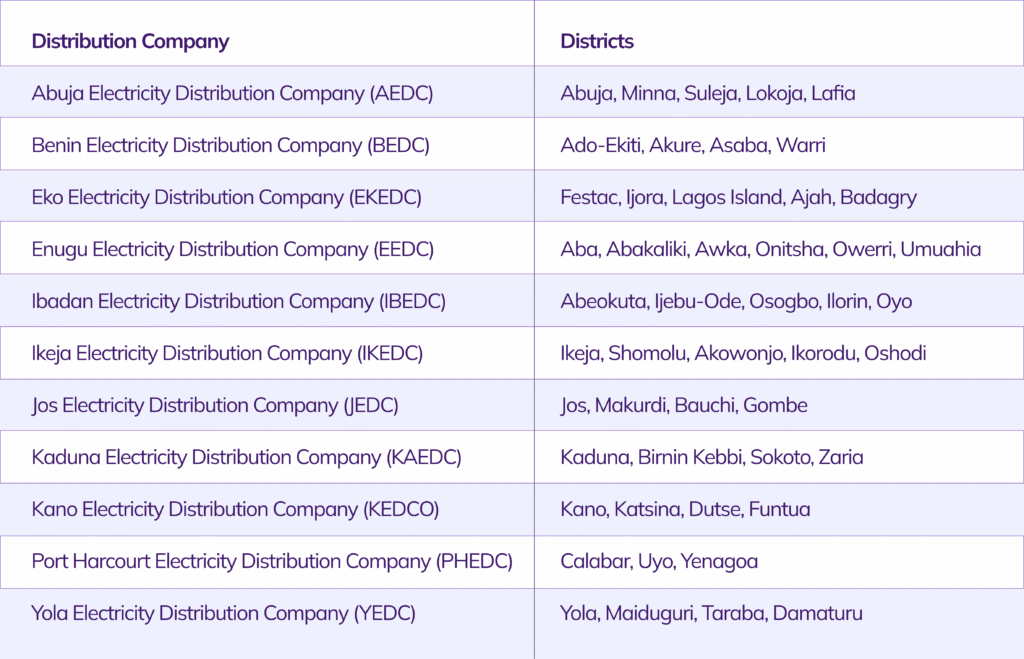
DISCOs (Distribution Companies) are responsible for distributing energy to consumers in Nigeria. They receive electricity from the Transmission Company of Nigeria (TCN) and supply it to homes, businesses, and industries within their designated regions. Discos also handle metering, billing, and revenue collection for electricity usage. Nigeria has eleven distribution companies.
Here’s a list of the major electricity distribution companies (DISCOs) in Nigeria and the areas they cover;
Source: NERC
Recharging your prepaid meter is now easier than ever! No more worrying about unexpected power outages. Just follow this guide to top up your meter units easily.
Download the Kuda app on the Google Play Store or the App Store.