Premium customers: earn 20% a year on a 3-month Locked Savings plan. Limited availability. Learn more.


USSD Codes For Nigerian Banks And How To Use Them
Make transactions without using the internet or a smartphone. Use our complete list of Nigeria bank USSD codes for transfers, airtime purchases, and bills payments.

Introduction
What do you do when you need to send money but you don’t have internet data or a smartphone?
USSD codes are the answer. They’re a simple and reliable way to make transactions without the internet or a smartphone.
What’s a USSD code?
USSD stands for Unstructured Supplementary Service Data and you’ve probably seen a USSD code before. It’s a short code you dial on your phone, like *123#, and it lets you do basic things such as check your account balance, make transfers, block or unblock your account, and buy airtime or data.
How to use USSD codes
1. To send money:
- Dial your bank’s USSD code (e.g., *737# for GTBank, *919# for UBA).
- Choose the option for transfers.
- Choose to send money to an account at your bank or to another bank.
- Type in the beneficiary’s account number and the amount you’d like to send.
- Confirm the transaction with your PIN.
2. To buy airtime
- Dial your bank’s USSD code.
- Choose the option for airtime purchases.
- Choose to buy airtime for yourself or for someone else.
- Type in the amount of airtime and the phone number, then confirm the transaction with your PIN.
3. To check your account balance:
- Dial your bank’s USSD code.
- Choose the option for checking your account balance.
- Confirm with your PIN to see your account balance.Drag
4. To pay bills:
- Dial your bank’s USSD code.
- Choose the option for bill payments.
- Choose the kind of bill you’d like to pay (e.g., electricity, cable TV, water).
- Type in the necessary details (e.g., meter number, amount) and confirm with your PIN.
5. To get a bank statement:
- Dial your bank’s USSD code.
- Choose the option for bank statement or transaction history.
- Choose the period (e.g., last five transactions, monthly statement).
- Confirm with your PIN, and your bank will send you your statement by email or to your phone.
6. To block or unblock your account
- Dial your bank’s USSD code.
- Choose the option for blocking or unblocking your account.
- Follow the prompts on your screen and confirm with your PIN.
7. To borrow money:
- Dial your bank’s USSD code.
- Choose the option for loans or credit services.
- Follow the prompts on your screen to check your eligibility and apply for a loan.
Why USSD codes are good for making transactions
- You won’t need an internet connection: Unlike internet banking, USSD works without the internet, which makes it perfect for those times when your data has run out or your internet connection is weak.
- It works on any phone: You don’t need a smartphone to use USSD. It even works on older phones.
- You can use it in remote areas: USSD banking makes it possible to access banking services in remote locations that may not have bank branches.
- It’s convenient: You can access banking services any time, whether it’s paying utility bills, sending money, or buying airtime
- USDD transactions are quick: Transfers, airtime purchases, and bill payments are completed almost instantly.
- You won’t have to go to a bank: USSD takes away the need to go to a bank branch, saving you time and stress.
How to add money to your Kuda account by USSD
Dial the right USSD code below from the phone number linked to your other bank account to add money to your Kuda account.
From GTBank to Kuda: *737*50*100*416#
From Zenith Bank to Kuda: *966*100*Kuda account number#
From Access Bank to Kuda: *901*100*Kuda account number#
From First Bank to Kuda: *894*100*Kuda account number#
From Wema Bank to Kuda: *945*Kuda account number*100#
From Polaris Bank to Kuda: *833*100*Kuda account number#
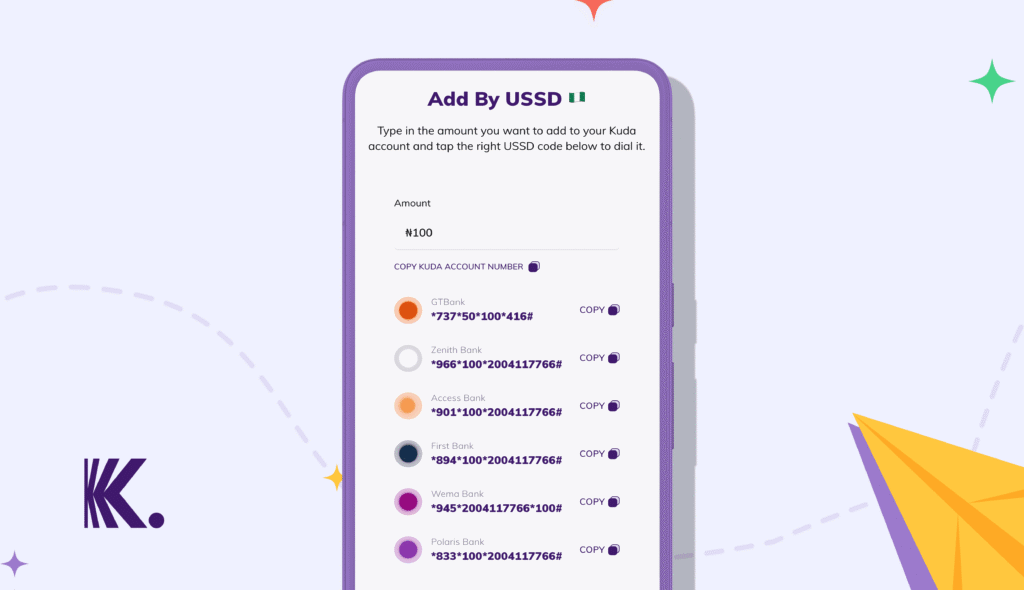
USSD codes for Nigerian banks
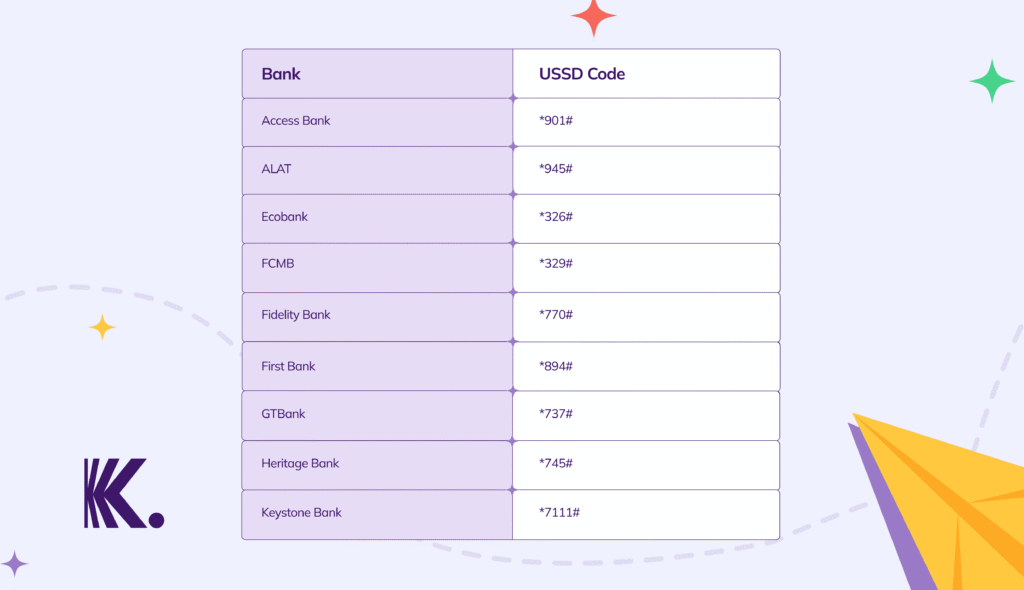
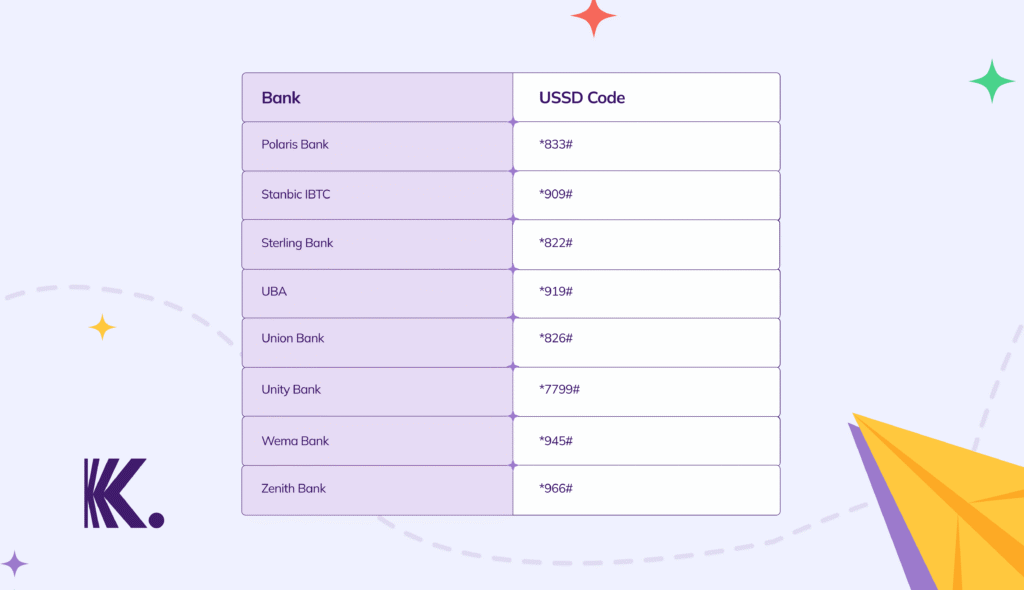
Specific USSD codes for Nigerian bank transactions
1. USSD codes for Access Bank
- General services: *901#
- Check your account balance: *901*00#
- Buy airtime for yourself: *901*amount#
- Buy airtime for someone else: *901*amount*phone number#
- Deactivate your bank account: *901*911#
- Pay a bill: *901*3#
- Send money to an Access Bank account: *901*1*amount*account number#
- Send money to another bank: *901*2*amount*account number#
- Open an account or change your PIN: *901*0#
2. USSD codes for ALAT
- General services: *945#
- Check your account balance: *945*0#
- Buy airtime for yourself: *945*amount#
- Buy airtime for someone else: *945*phone number*amount#
- Send money to an ALAT account: *945*account number*amount#
- Send money to another bank: *945*account number*amount#
3. USSD codes for Ecobank
- General services: *326#
- Check your account balance: *326*0#
- Buy airtime for yourself: *326#, select 1, input phone number
- Buy airtime for someone else: *326# ,select 1, input phone number
- Pay a bill: *326#
- Send money to an Ecobank account: *326#
- Send money to another bank: *326#
4. USSD codes for Fidelity Bank
- General services: *770#
- Check your account balance: *770*0#
- Buy airtime for yourself: *770*amount#
- Buy airtime for someone else: *770*phone number*amount#
- Make a cash withdrawal: *770*8*amount#
- Deactivate USSD on your account: *770*phone number#
- Block your ATM card: *770*911#
- Deactivate USSD on your phone number: *770*911*phone number#
- Change your USSD PIN: *770*00#
- Pay a bill: *770#
- Send money to a Fidelity bank account: *770*account number*amount#
- Send money to another bank: *770*account number*amount#
5. USSD codes for FCMB Bank
- General services: *329#
- Check your account balance: *329*00#
- Buy airtime for yourself: *329*amount#
- Buy airtime for someone else: *329*amount*phone number#
- Deactivate USSD: *329*911#
- Buy data: *329*1*phone number#
- Pay your DStv or GOtv subscription: *329*2*amount*smartcard number#
- Buy a meter token: *329*3*amount*meter number# or *329*3*amount*account ID#
- Reset your USSD PIN: *329*0#
- Send money to an FCMB bank account or any other bank: *329*amount*account number#
6. USSD codes for First Bank
- General services: *894#
- Check your account balance: *894*00#
- Open a bank account: *894*0#
- Buy airtime for yourself: *894*amount#
- Buy airtime for someone else: *894*amount*phone number#
- Check your recent transactions: *894*account number#
- Set up USSD on your phone: *894*0
- Send money to a First bank account or any other bank: *894*amount*account number#
7. USSD codes for GTBan
- General services: *737#
- Check your account balance or BVN: *737*6*1#
- Open a bank account: *737*0#
- Buy airtime for yourself: *737*amount#
- Buy airtime for someone else: *737*amount*phone number#
- Create your USSD PIN: *737*5#
- Check your recent transactions: 737*6*1#
- Buy mobile data: 737*4#
- Make enquires: *737*6#
- Reactivate your account: *737*11#
- Send money to a GTBank account: *737*1*amount* account number#
- Send money to another bank: *737*2*amount* account number#
8. USSD codes for Keystone Bank
- General services: *7111#
- Check your account balance: *7111*00#
- Activate your debit card: *7111*9*123#
- Buy mobile data: *7111*5#
- Pay a bill: *7111*2#
- Buy airtime for someone else: *7111*amount*phone number#
- Buy airtime for yourself: *7111*amount#
- Send money to a Keystone bank account or to another bank: *7111*amount* account number#
- Set up USSD on your phone: *7111*0#
9. USSD codes for Polaris Bank
- General services: *833#
- Check your account balance: *833*6#
- Buy airtime for yourself: *833*amount#
- Buy airtime for someone else: *833*amount*phone number#
- Open a bank account: *833*1#
- Pay a bill: *833*2#
- Pay with masterpass: *833*7#
- Send money to a Polaris bank account or to another bank: *833*amount*account number#
- Update your BVN: *833*5#
10. USSD Codes for Stanbic IBTC Bank
- General services: *909#
- Check your account balance: *909*1*1#
- Buy airtime for someone else: *909*amount*phone number#
- Buy airtime for yourself: *909*amount#
- Send money to another bank: *909*22*amount*account number#
- Send money to a Stanbic IBTC bank account: *909*11*amount*account number#
11. USSD codes for Sterling Bank
- General services: *822
- Check your account balance: *822*6#
- Buy airtime for someone else: *822*amount*phone number#
- Buy airtime for yourself: *822*amount#
- Check your account number: *822*8#
- Set up USSD on your phone: 822*1*account number#
- Send money to another bank: *822*5*amount*account number#
- Send money to a Sterling bank account: *822*4*amount*account number#
12. USSD codes for UBA
- General services: *919#
- Check your account balance: *919*00#
- Buy airtime for someone else: *919* phone number* amount#
- Buy airtime for yourself: *919*14#
- Make a cash withdrawal using USSD: *919*30*amount#
- Pay a bill: *919*5#
- Send money to another bank: *919*4*account number*amount#
- Send money to a UBA bank account: *919*3*account number*amount#
13. USSD codes for Union Bank
- General services: *826#
- Check your account balance: *826*4#
- Buy airtime for someone else: *826*amount*phone number#
- Buy airtime for yourself: *826*amount#
- Create a USSD transaction PIN: *826*5#
- Set up USSD: *826#
- Block your bank account from your phone *826.6#
- Send money to another bank: *826*2*amount*account number#
- Send money to a Union bank account: *826*1*amount*account number#
14. USSD codes for Unity Bank
- General services: *7799#
- Check your account balance: *7799*0#
- Add money to a Bet9ja wallet: *7799*403*Bet9ja ID*amount#
- Block your bank account: *7799*9*phone number#
- Verify your BVN: *7799*5#
- Make a cash withdrawal: *7799*8*amount#
- Buy airtime for yourself: *7799*amount#
- Buy airtime for someone else: *7799*phone number*amount#
- Send money to another bank: *7799*2*account number*amount#
- Send money to a Unity bank account: *7799*1*account number*amount#
- Use USSD on a POS: *7799*000*reference ID#
15. USSD codes for Wema Bank
- General services: *945#
- Check your account balance: *945*0#
- Buy airtime for someone else: *945*phone number*amount#
- Buy airtime for yourself: *945*amount#
- Pay a bill: *945*3#
- Send money to another bank: *945*account number*amount#
- Send money to a Wema bank account: *945*account number*amount#
16. USSD codes for Zenith Bank
- General services: *966#
- Buy airtime for yourself or for someone else: *966*amount*mobile number#
- Block your ATM card: *966*60#
- Check your account balance: *966*00#
- Deactivate your bank account: *966*911#
- Deactivate your mobile banking profile: *966*20*0#
- Open a bank account: *966*0#
- Pay a bill: *966*7*amount*customer ID#
- Reset your USSD password or PIN: *966*60#
- Send money to a Zenith bank account or to another bank: *966*amount*account number#
- Update your BVN: *966*BVN#
How to use USSD codes safely
1. Never share your USSD PIN with anyone: your USSD PIN is your secret, a key to your bank account. Please, keep it that way. Your bank will never call or text you to ask for it your PIN
2. Don’t use USSD banking on public or shared devices: using USSD banking on a phone that isn’t yours can put your account at risk. Always make USSD transaction on your own phone.
3. Check your bank statements: take a proper look at your bank statements and transaction history regularly. If you spot any transactions that you didn’t make, report them to your bank immediately.
4. Use a strong and unique PIN: never use common PINs such as ‘1234’, ‘0000’ or your birth year.
5. Turn on transaction alerts: sign up for SMS or email alerts to receive instant notifications for transactions on your account. This will help you know if an unauthorised transaction is ever made from your account.
6. Keep your SIM card safe: if your SIM card is stolen, fraudsters could access your bank details. If you lose your SIM card, let your mobile network provider know immediately to block unauthorised access.
7. Change your USSD PIN regularly: changing your PIN every month adds an extra layer of security and reduces the risk of fraud.
8. Don’t save your USSD PIN on your phone: it may be convenient to save USSD PIN in your phone’s notes or messages, but that makes it easily accessible to fraudsters.
9. Lock your phone with a secure password or biometric authentication: if you use a smartphone, set a strong password or a PIN, or use biometric authentication (your fingerprint or Face ID) to protect it.
FAQs
1. Can I use USSD for transactions without a smartphone?
Yes, you can use USSD for transactions without a smartphone. USSD codes work on all types of mobile phones, including the most basic ones.
2. What if my phone number is not linked to my bank account?
If your phone number is not linked to your bank account, you won’t be able to make transactions with USSD.
To link your phone number, go to a branch of your bank with a valid ID and your account details.
Alternatively, your bank might allow you to link your phone number on your banking app or by dialing a USSD code.
3. How do I register to make transactions with USSD?
To register, follow these steps:
1. Dial your bank’s USSD code (e.g., *894# for First Bank, *901# for Access Bank).
2. Follow the prompts on your screen to link your bank account to your phone number.
3. Create a four-digit PIN for authorising transactions.
4. Will I be charged for USSD transactions?
Yes, your bank will charge a small fee for certain transactions like transfers and bill payments. Ask your bank about specific charges.
5. What should I do if I can’t make transactions with USSD?
If you’ve registered to make transactions with USSD, make sure you have enough airtime or confirm that your bank’s USSD service is active.
6. Can I get a loan on Kuda without using USSD?
Yes, you can get an instant loan on Kuda directly in the app – no USSD code required.
Conclusion
With the USSD codes we listed above, you can make transactions easily without worrying about unsteady internet connections or long bank queues.
Whether you’re sending money, buying airtime, or just checking your account balance, USSD makes transactions quick and convenient.